Docs and help centers

Help docs,on your own site.

Write guides and help articles in BrightSite and publish them at yoursite.com/docs, with a sidebar, search, and a table of contents on every page. BrightSite's own help center runs on it.

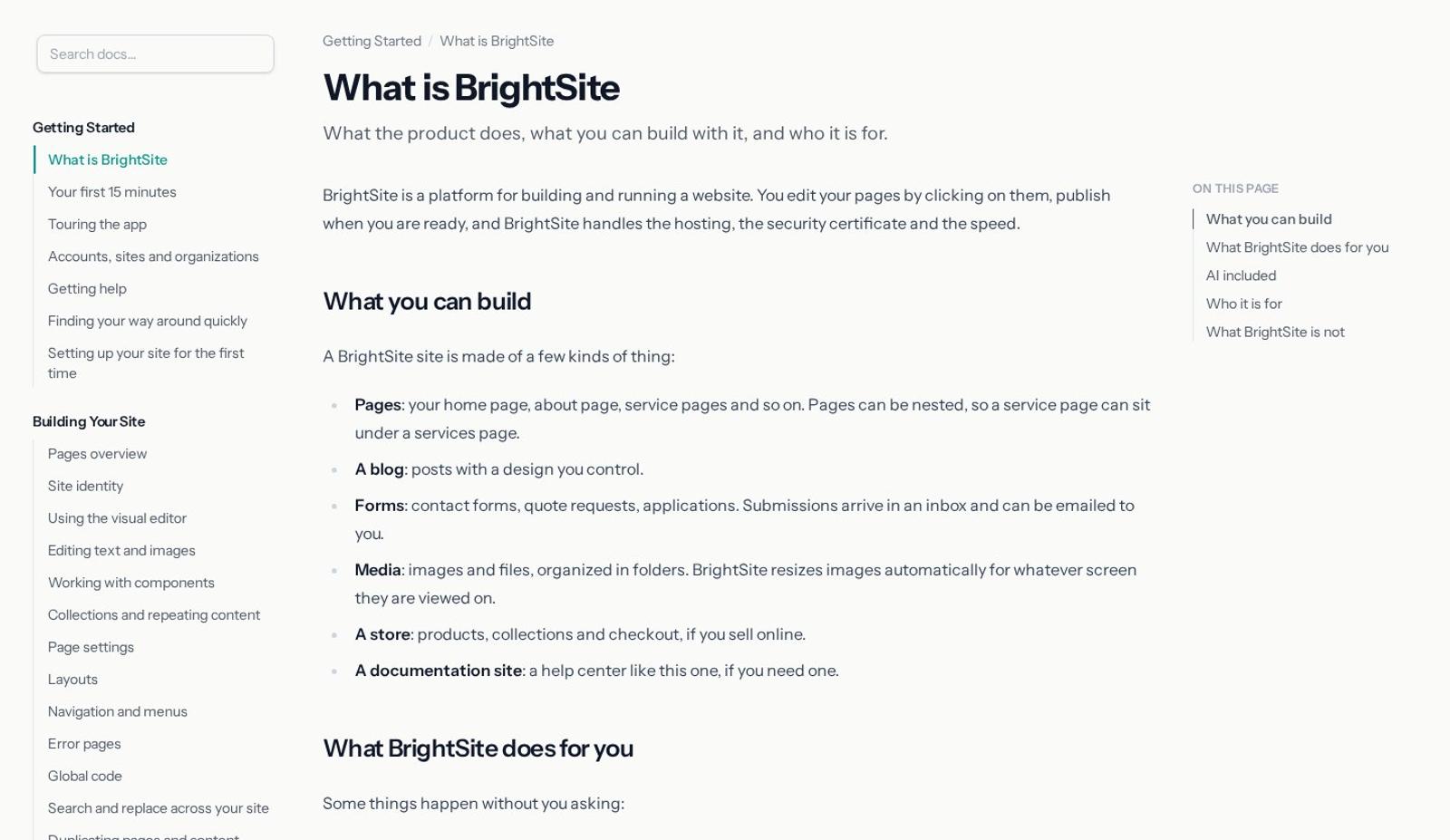
onbrightsite.com/docs
The BrightSite help center with a sidebar, an article, and an On this page list
  1. 01

    Write the article.

    Headings become the table of contents as you type, and code blocks are highlighted for you.

  2. 02

    Put it in its place.

    Nest pages under sections, reorder them, and give sidebar items short labels or a New badge.

  3. 03

    Publish. People find it.

    The page goes live at /docs with search, breadcrumbs, and next and previous links, and it's added to your sitemap and llms.txt.

By hand or by asking

Write it yourself, or have it drafted.

Use the docs editor, or ask Lumi, Claude, or ChatGPT to write, move, and publish help pages for you.

Write a help article

Add a page under the right section, write it in the editor, and publish it now or schedule it for later.

Tell the agent what the article should cover and where it goes. It writes a draft for you to review.

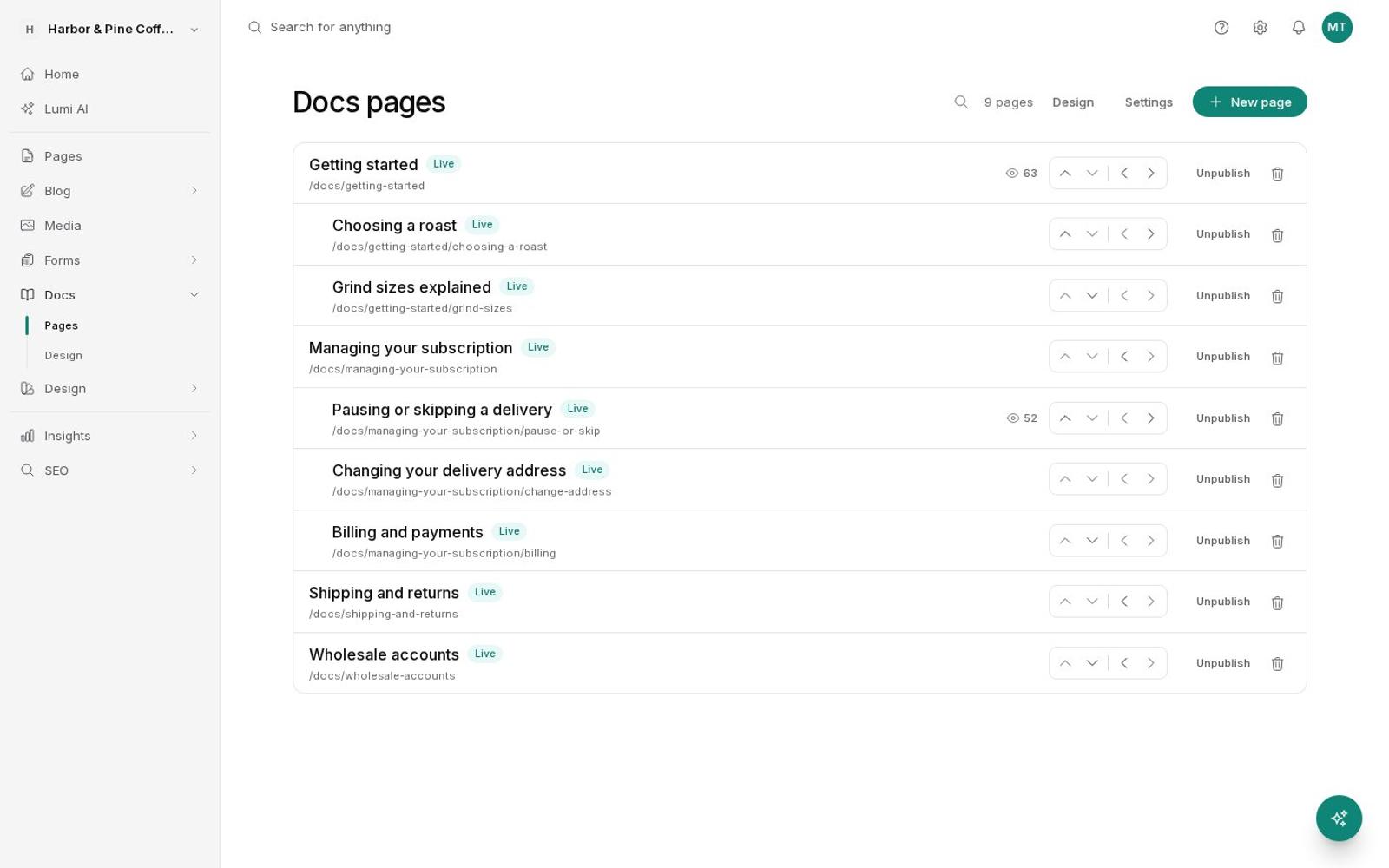
Docs pages with nested sections and Live badges
Prompt

Write a help article on pausing or skipping a delivery, with steps for each, under Managing your subscription.

Create doc pagedraft
Drafted "Pausing or skipping a delivery" under Managing your subscription, with a section for each. Publish it when you've had a look.

Reorganize the sidebar

Use the arrows to move pages up, down, in, or out, so each one sits under the right section.

Describe the new structure. The agent creates the section and moves the pages into it.

A help center sidebar with sections and nested pages
Prompt

Make a Shipping section and move the returns and delivery address pages under it.

Create doc pageShipping
Move doc page× 2
Shipping is now a section with Returns and Changing your delivery address under it.

Match your brand

Design the docs home and the article page like any other template, and choose which parts show: sidebar, contents, breadcrumbs, search, and dates.

Ask the agent to make the docs look like the rest of your site. It updates both templates as drafts.

Docs settings
Sidebar
Table of contents
Previous and next links
Breadcrumbs
Search
Last updated date
Prompt

Make the help center use the same fonts and green as the main site, and put search at the top of the docs home.

Update docs index design
Update docs article design
Both docs templates now use your site's fonts and green, with search at the top of the docs home. They're drafts until you publish.
Also in Docs

Everything a help center should have.

  1. 01

    Nested sections

    Pages sit up to two levels under a section, in the order you set.

    Getting startedInstallYour first pageAdd a section
  2. 02

    Search as you type

    Full-text search with suggestions, styled to match your site.

    domDomainsConnect a domain
  3. 03

    Table of contents

    Built from each page's headings, with no extra work.

    On this pageOverviewSet upVerify
  4. 04

    Highlighted code

    Code blocks get syntax highlighting for technical guides.

    const total = price * qtyreturn total.toFixed(2)
  5. 05

    Breadcrumbs and next links

    Readers always know where they are and what comes next.

    Docs › Domains › ConnectNext: Verify →
  6. 06

    Scheduled publishing

    Write ahead and let a page go live on the day a feature ships.

    OCT14Goes live9:00 AM
  7. 07

    Sidebar labels and badges

    Give a page a shorter sidebar name, a New badge, or hide it from the sidebar.

    BillingWebhooks NewDomains
  8. 08

    Found by search and AI

    Docs pages are in your sitemap and llms.txt and carry article structured data.

    sitemap.xmlllms.txtArticle
Questions

About docs.

Where do docs live?

On your own domain, at /docs by default, next to the rest of your site. You can change the path.

Is search included?

Yes. Readers get full-text search with suggestions as they type, styled to match your site.

Can I design the docs pages?

Yes. The docs home and the article page are templates you design like any other, and you choose whether to show the sidebar, contents, breadcrumbs, search, and last-updated date.

Can AI write help articles?

Yes. Lumi, Claude, and ChatGPT can create, update, move, and publish doc pages. New pages start as drafts you can review.

Do docs help with SEO?

Yes. Docs pages are listed in your sitemap and llms.txt, carry article structured data, and have their own titles and descriptions.

Answer the question
before it's asked.

7 days free. No credit card.Start free trial →